
Your customer sends a battery brand and asks: “It is on Deye’s list, so can we quote it?”
Start with the complete inverter model and battery model. Then match the voltage class, communication interface, lithium setup code and firmware requirement in the current Deye list. Approval follows the exact model combination shown in the same row.
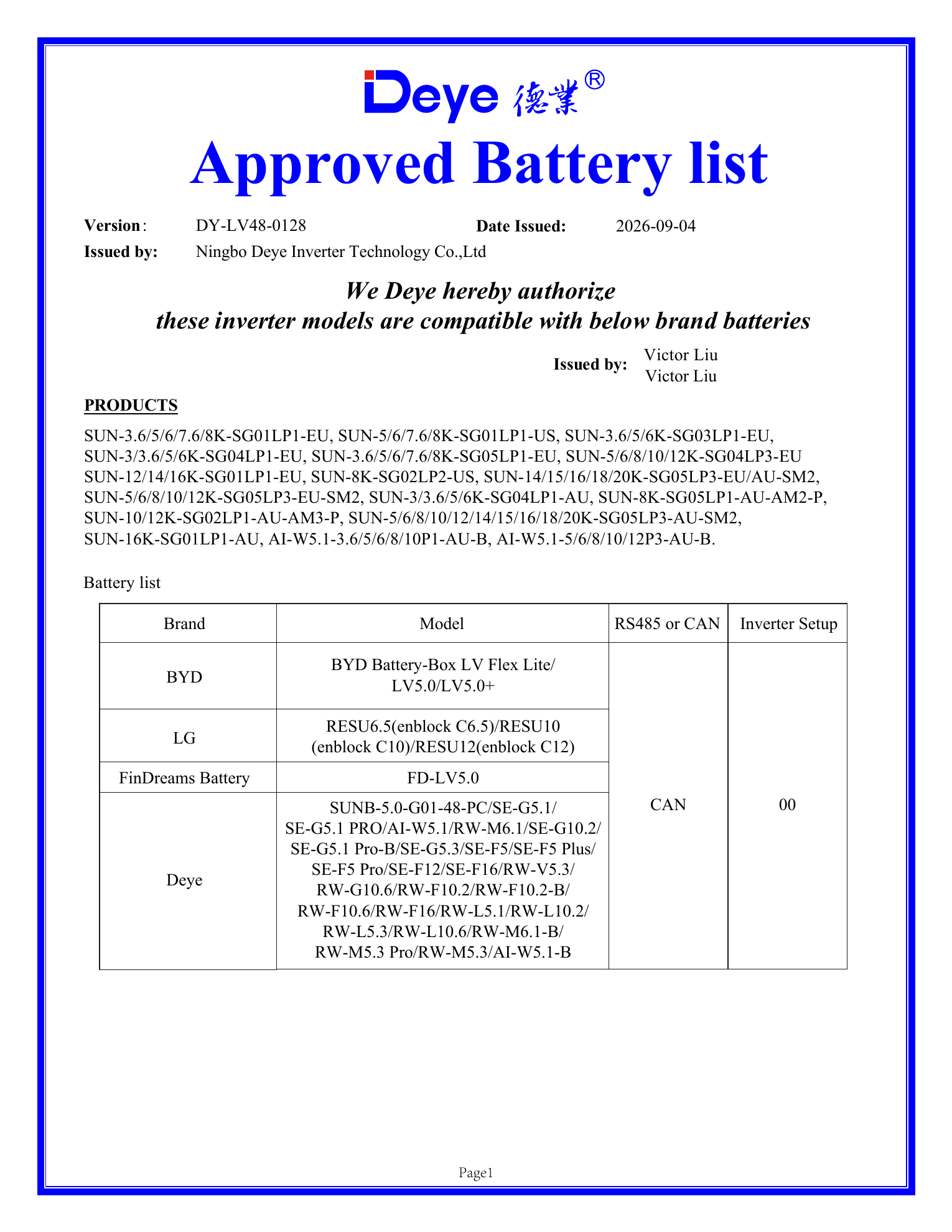
Deye publishes separate approved battery lists for low-voltage and high-voltage hybrid inverters. The current source files used here are the LV list DY-LV48-0128, issued September 4, 2026, and the HV list DY-HV(160-800)-037, issued July 10, 2026. The public files are available in the CVC Download Center with Deye source attribution. You can also check the Deye official download center.
For a quotation, record the exact inverter model, exact battery model, LV or HV architecture, CAN or RS485 method, setup code and firmware version in one technical sheet.
Begin with the correct LV or HV list
The inverter voltage architecture decides which list to open.
| Inverter architecture | Battery side | Deye document | First check |
|---|---|---|---|
| Low voltage | 24 V or 40–60 V class, depending on model | Deye Approved LV Battery List | The complete inverter model appears in the list header |
| High voltage | High-voltage battery stack | Deye Approved HV Battery List | Inverter series, battery model and module quantity match the row |
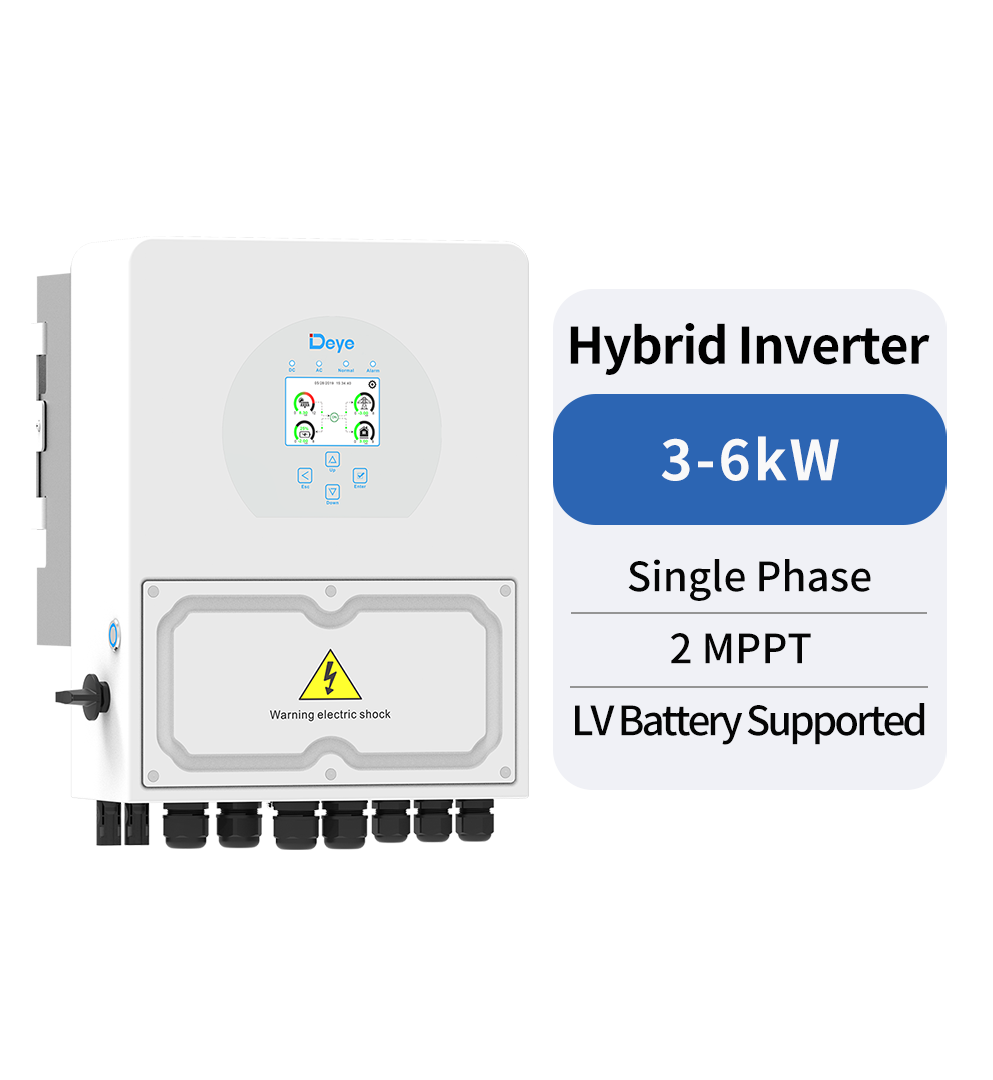
The Deye SUN-3/3.6/5/6K-SG04LP1-EU is a low-voltage single-phase hybrid inverter family. The standard 3–6 kW models use a 40–60 V battery range. The 5 kW model lists a maximum battery charge and discharge current of 120 A, while the 6 kW model lists 135 A.
The HV list records battery module quantity and minimum inverter firmware. Mixing the two documents puts the project into the wrong battery architecture before commissioning.
Check the document version before the battery brand
The version number and issue date identify the evidence used for the quotation and commissioning record. Save both in the project folder.
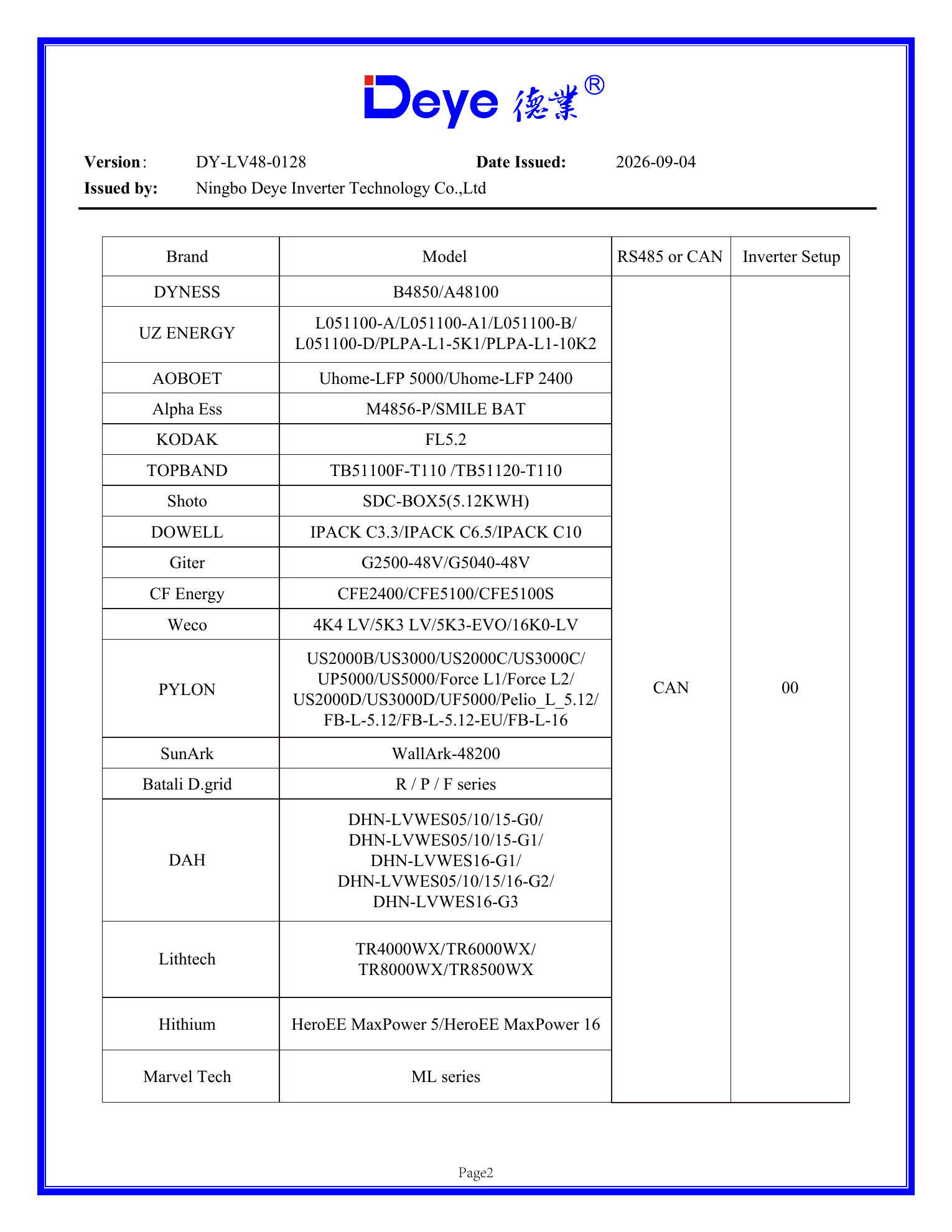
The LV file used here is DY-LV48-0128, issued on September 4, 2026. The HV file is DY-HV(160-800)-037, issued on July 10, 2026. If a customer sends an older PDF, compare its version with the current file before selecting the setup code or preparing the communication cable.
| Field | Recorded value |
|---|---|
| Approved-list type | LV |
| Document version | DY-LV48-0128 |
| Issue date | 2026-09-04 |
| Inverter | SUN-5K-SG04LP1-EU |
| Battery | Pylontech US5000 |
| Communication | CAN |
| Lithium mode setup code | 00 |
Match the complete inverter model
Read the model from the inverter nameplate, carton label or system information screen. Copy every part of the model, including power, phase, voltage family and regional suffix.
SUN-5K-SG04LP1-EU identifies the 5 kW power class, the SG04 platform, the low-voltage single-phase LP1 family and the EU regional version. Record the full model instead of “Deye 5 kW.” Deye has several 5 kW platforms with different battery voltage architectures and approved-list coverage.
Match the complete battery model
The LV list groups products by battery manufacturer, then names the models approved under that group. One brand can have several battery generations, BMS versions and communication implementations.
The PYLON row in LV list version DY-LV48-0128 includes models such as US2000B, US3000, US2000C, US3000C, UP5000, US5000, Force L1 and Force L2. A quotation for US5000 should record US5000 rather than the general label “Pylontech battery.” Approval is model-specific. Match the model text on the battery label to the text in the list.
Read the communication method and setup code together
The communication column tells the installer which BMS link the listed combination uses. The setup number tells the inverter which battery protocol profile to load.
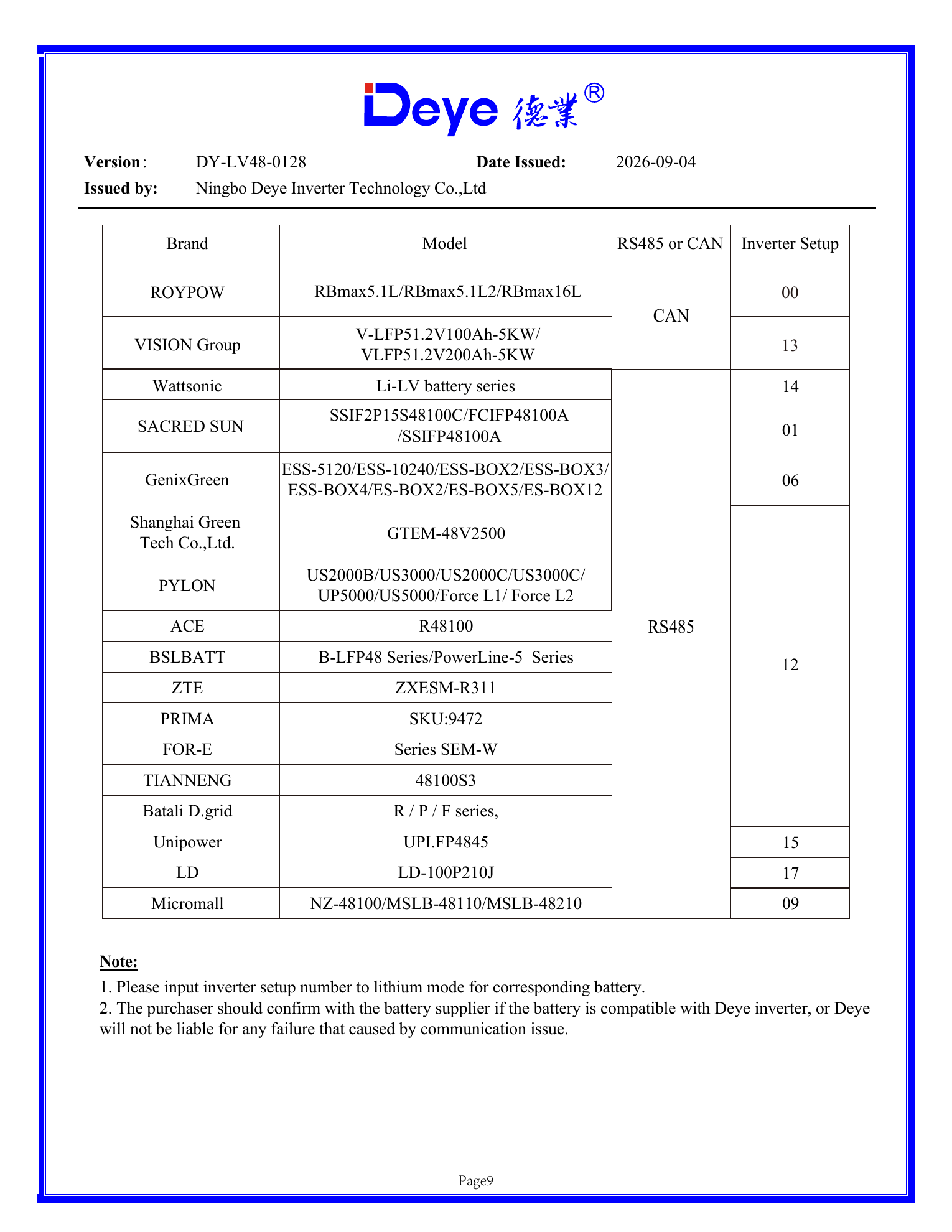
For the PYLON models, the LV list shows CAN communication and setup code 00. Other approved entries use different codes. Page 9 of the same LV list shows examples including 13 for Vision, 14 for Wattsonic, 01 for Sacred Sun, 06 for GenixGreen, 15 for Unipower and 17 for LD. Use the code in the same approved row, even when another battery also communicates through CAN.
Record these four items as one set: battery model, CAN or RS485, cable part number or pinout drawing, and Deye lithium mode setup code. The CVC CAN/RS485 battery communication checklist covers the physical connection, termination, address and master/slave checks that follow the list review.
Enter the setup code in Lithium Mode
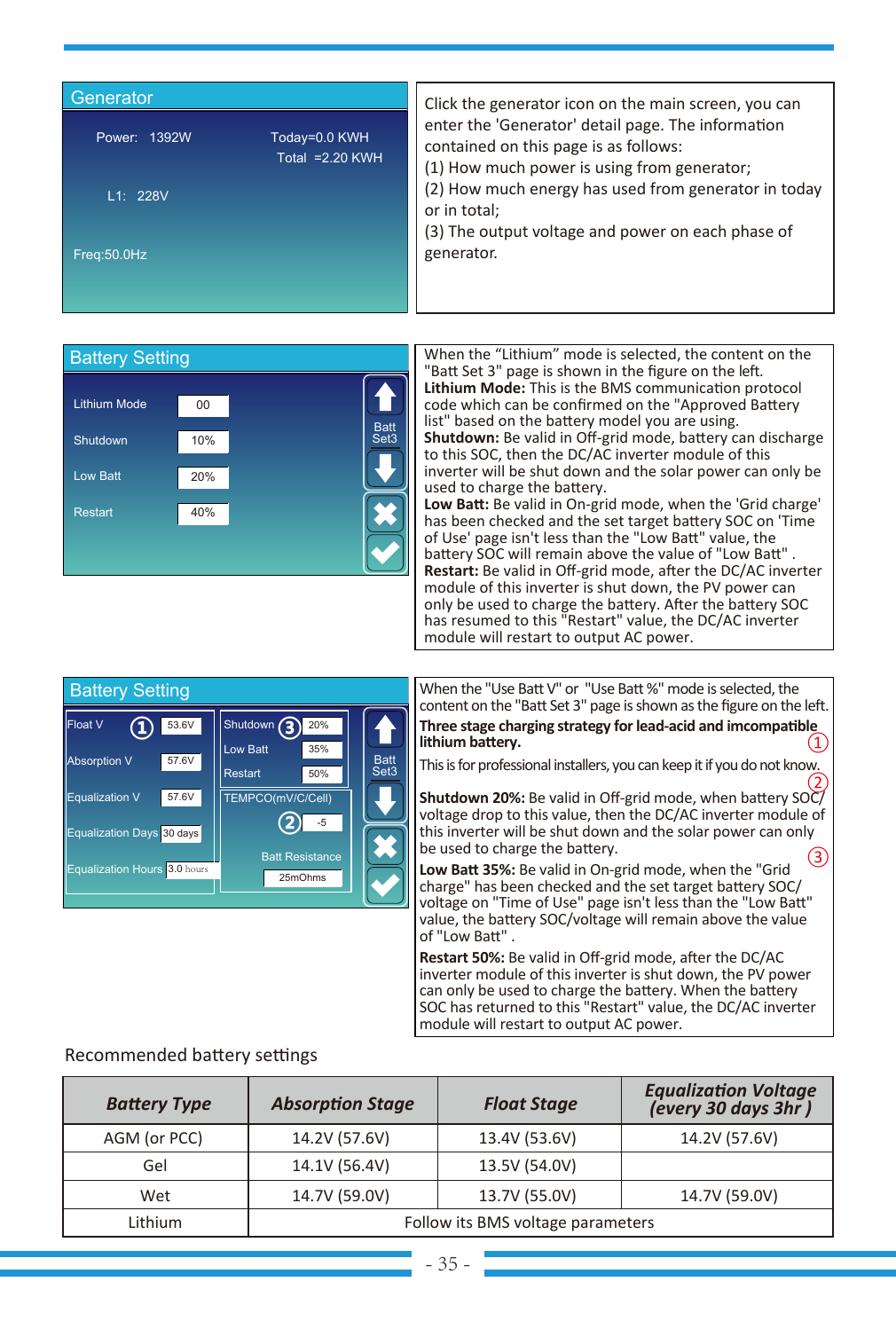
The Deye SUN-3/3.6/5/6K-SG04LP1-EU manual places the protocol setting under Battery Setting. The field is labelled Lithium Mode. The manual describes this value as the BMS communication protocol code and directs the installer to the approved battery list.
For the Pylontech example: Battery Setting → Lithium → Lithium Mode 00.
The same screen contains battery operating values such as shutdown SOC, low-battery SOC, restart SOC and charge or discharge current. The approved-list code establishes BMS communication. The current limits and SOC thresholds then follow the battery configuration and the project’s backup strategy.
| Inverter model | Maximum battery charge current | Maximum battery discharge current |
|---|---|---|
| SUN-3K-SG04LP1-EU-24 | 140 A | 140 A |
| SUN-3K-SG04LP1-EU | 70 A | 70 A |
| SUN-3.6K-SG04LP1-EU | 90 A | 90 A |
| SUN-5K-SG04LP1-EU | 120 A | 120 A |
| SUN-6K-SG04LP1-EU | 135 A | 135 A |
Set the working current from the lower limit in the battery-and-inverter pair. If the inverter supports 120 A and the battery bank supports 100 A continuously, 100 A is the system limit.
Use the firmware columns in the HV list
The Deye HV list adds minimum HMI and MCU versions for many combinations. These are commissioning parameters.
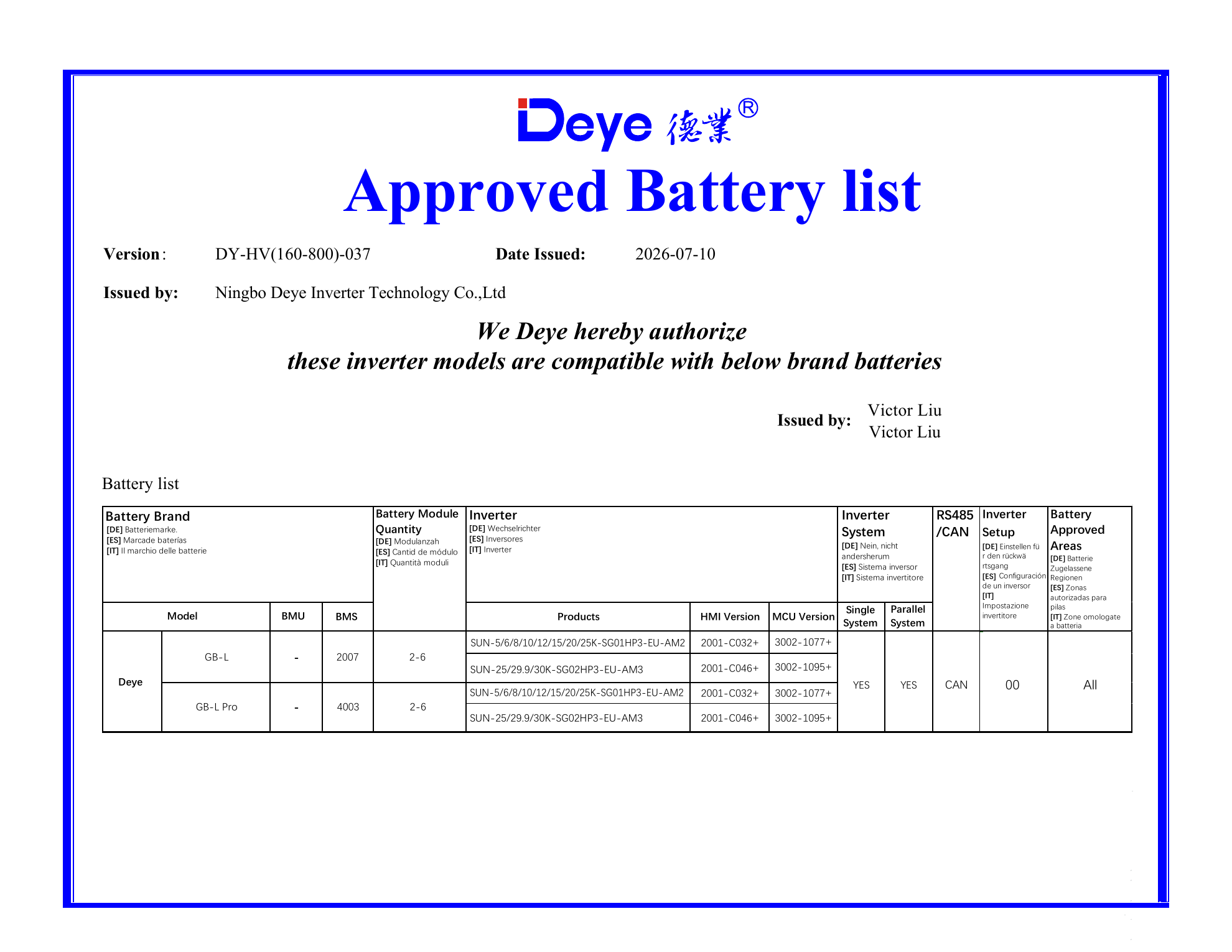
The first row of version DY-HV(160-800)-037 provides a useful example for Deye GB-L and GB-L Pro batteries.
| HV list field | Approved entry |
|---|---|
| Battery model | Deye GB-L / GB-L Pro |
| Battery modules | 2–6 |
| Inverter family | SUN-5/6/8/10/12/15/20/25K-SG01HP3-EU-AM2 and SUN-25/29.9/30K-SG02HP3-EU-AM3 |
| Minimum HMI | 2001-C032+ or 2001-C046+, according to the inverter group |
| Minimum MCU | 3002-1077+ or 3002-1095+, according to the inverter group |
| Communication | CAN |
| Setup code | 00 |
| Single/parallel | Yes |
| Approved area | All |
The plus sign means the stated version or a later approved version. Record the installed HMI and MCU numbers during sample acceptance. If either number is below the row requirement, arrange the approved firmware update before commissioning.
The LV Pylontech row leaves the HMI and MCU minimums unspecified. Record the installed firmware in the commissioning file and use the current approved list, inverter manual and supplier confirmation as the working evidence set.
Worked check: SUN-5K-SG04LP1-EU with Pylontech US5000
Here is the full check an installer or distributor can copy into a quotation file.
1. Identify the inverter
- Model: SUN-5K-SG04LP1-EU
- Architecture: low voltage, single phase
- Battery range: 40–60 V
- Maximum charge/discharge current: 120 A
2. Open the current LV list
- Document: Deye Approved LV Battery List
- Version: DY-LV48-0128
- Issue date: September 4, 2026
- Inverter model appears in the applicable-inverter header
3. Find the exact battery
- Brand group: PYLON
- Model: US5000
- Communication: CAN
- Lithium Mode: 00
4. Complete the project record
- Confirm the US5000 nameplate and battery firmware
- Use the CAN cable and pinout supplied for this inverter-battery pair
- Record the battery bank quantity and resulting continuous current
- Set inverter charge and discharge limits within both product ratings
- Save screenshots of the Battery Setting page and live BMS values
This is the evidence package needed for a repeatable quotation and a clean handover to the installer.
Quotation fields worth saving every time
| Field | Where to obtain it | Why it belongs in the quotation file |
|---|---|---|
| Complete inverter model | Nameplate or information screen | Selects the correct architecture, list and manual |
| Complete battery model | Battery label and datasheet | Selects the exact approved row |
| List version and issue date | Top of the official PDF | Keeps the technical reference traceable |
| LV or HV architecture | Inverter and battery specifications | Prevents a voltage-class mismatch |
| CAN or RS485 | Approved-list row | Defines the BMS communication path |
| Setup code | Approved-list row | Selects the protocol profile in Lithium Mode |
| HMI and MCU versions | Inverter information screen | Confirms the minimum firmware in HV rows |
| Module quantity | Approved-list row and system design | Confirms the supported stack or parallel configuration |
| Cable pinout | Inverter and battery documentation | Prevents communication wiring errors |
| Battery current rating | Battery datasheet | Sets the charge and discharge current limit |
Use the approved list to establish communication compatibility. Complete the electrical design with battery voltage, continuous current, module quantity, capacity and backup-load calculations. Our broader Deye and Growatt battery compatibility guide connects these checks to quotation and system selection.
Download the source documents
The public manufacturer files used in this guide are prepared for direct download in the CVC Download Center:
- Deye Approved LV Battery List DY-LV48-0128
- Deye Approved HV Battery List DY-HV(160-800)-037
- Deye SUN-3/3.6/5/6K-SG04LP1-EU User Manual, 2026-04-27 edition
Each file keeps the Deye document title, version and source attribution. For future quotations, check the visible version date before reusing a saved copy. The Deye official manual index provides the manufacturer reference page.
Send CVC the five fields and get a matched supply option
Send us the inverter model, battery model, system voltage, communication port and installed firmware. CVC can coordinate current manufacturer documents, battery options, communication details, sample requirements and export quotation with suitable suppliers.
Explore our energy storage battery options and inverter solutions, or contact CVC with the project model list.
Frequently asked questions
Does a battery brand on the Deye list mean every model is approved?
No. Match the exact battery model in the approved row. The same brand can have several approved and unlisted models.
Where do I find the Deye lithium mode code?
Read the setup or lithium mode number in the approved battery list, then enter it under Battery Setting in the inverter interface.
Can two CAN batteries use the same Deye setup code?
They can share a code when the approved list assigns the same protocol profile. Use the number shown for the exact battery row.
Why does the HV list show HMI and MCU numbers?
Those fields identify the minimum inverter firmware combination recorded for the HV battery row. Read the installed HMI and MCU versions before commissioning.
What should a distributor save with the quotation?
Save the list version, inverter and battery model photos, protocol and cable information, setup code, firmware record, current limits and the final communication test record.

Peter Yin
For a new 6–15kW three-phase project, compare the Deye three-phase hybrid inverter alternative checklist alongside the approved battery list before selecting a platform for your market.
Need help reading a Deye battery list?
Send the inverter model, battery model, voltage class and communication details. CVC can help organize the document check and supplier follow-up.