
What documents should a home battery supplier provide before a distributor quotes the product?
Home battery supplier documents decide whether a battery can move from a sales conversation into a quote. The file set has seven parts: the product datasheet, installation manual, certificate scope, warranty terms, transport files, BMS communication records and exact model/version information.
Each file answers a different question. The datasheet gives the electrical limits. The manual shows the wiring and start-up procedure. The certificate identifies the tested model and market. The warranty sets the service terms. The transport file follows the battery through shipping and customs. The communication file ties the battery to the inverter and the commissioning record.
For a distributor, importer or installer, the file set travels with the battery. A product image and a short parameter list may start a conversation, but they do not give an installer enough information to quote, commission or support the system.
The seven files that belong in a quotation-ready battery pack
| File | What the buyer uses it to check | What the file must identify |
|---|---|---|
| Product datasheet | Capacity, voltage, current, temperature, cycle life, IP rating and communication | Exact model, version and test conditions |
| Installation manual | Wiring, mounting, parallel operation, start-up and fault handling | Product model, wiring definition and manual revision |
| Certificate and scope | Whether the tested product matches the quoted battery and target market | Model, chemistry, standard, certificate holder and validity |
| Warranty document | Capacity retention, service period and responsibility for faults | Warranty start point, conditions, exclusions and service route |
| UN38.3 and SDS/MSDS | Whether the battery can be shipped and cleared through the target logistics route | Battery model, transport classification and document version |
| BMS communication file | Whether the battery can exchange data with the selected inverter | CAN/RS485 definition, protocol, pinout, settings and inverter list |
| Model and version record | Whether the sample, quotation and production batch are the same configuration | Model code, BMS version, firmware, batch and revision date |
One PDF rarely contains everything. The supplier may issue the datasheet, manual, warranty and transport file separately. That is fine as long as the model, revision and product scope agree across the set.
1. Product datasheet: read the electrical limits behind the headline capacity
A product title such as “5 kWh home battery” is not enough for a quotation. Read the voltage, current and test conditions behind that number.
The first fields to record are:
- Battery chemistry
- Nominal voltage
- Nominal capacity in Ah
- Nominal energy in kWh
- Usable energy and stated DoD
- Recommended and maximum continuous charge/discharge current
- Peak current and peak duration
- Operating voltage range
- Charging and discharging temperature range
- Cycle-life test condition
- IP rating and installation method
- Communication ports
- Maximum number of parallel units
- Dimension and weight
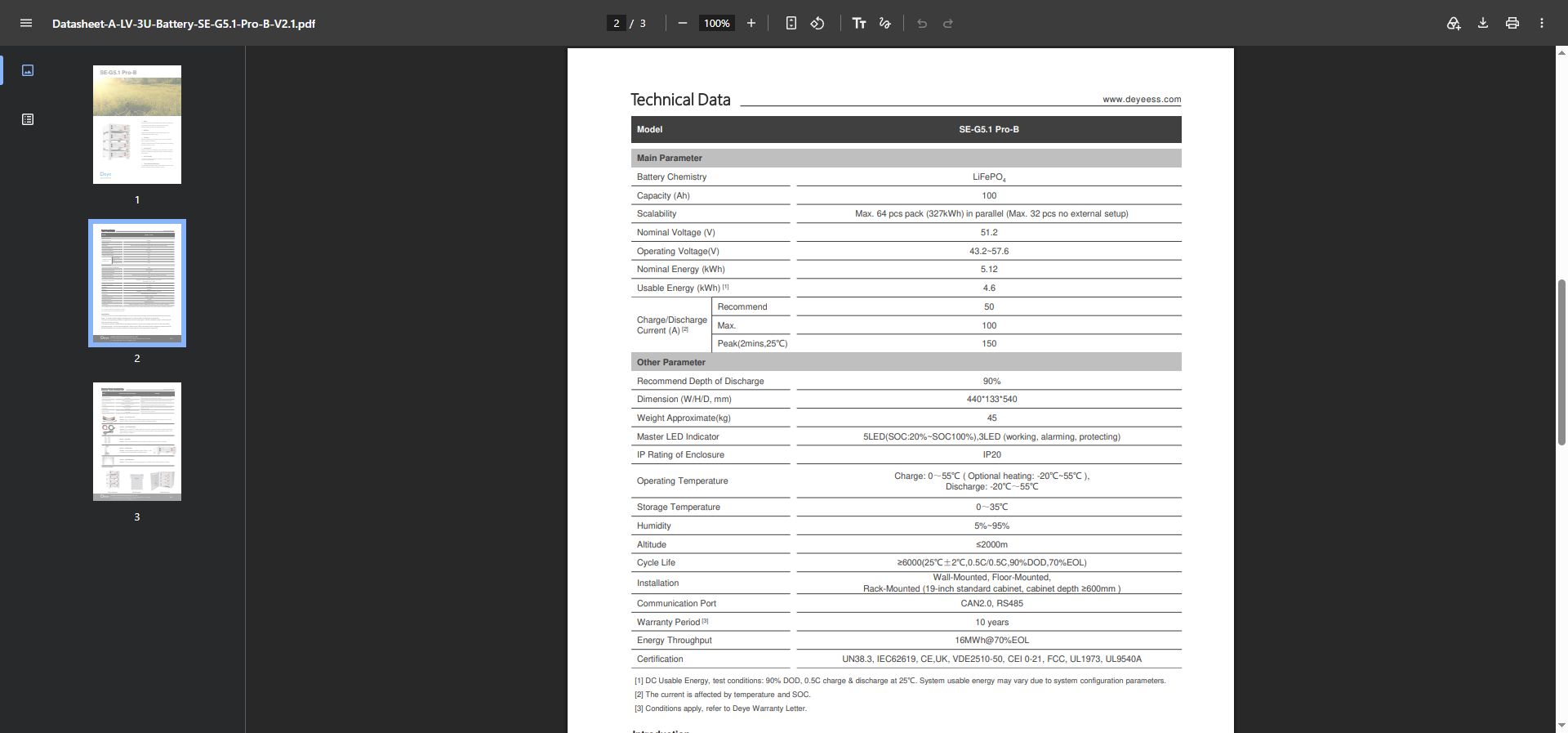
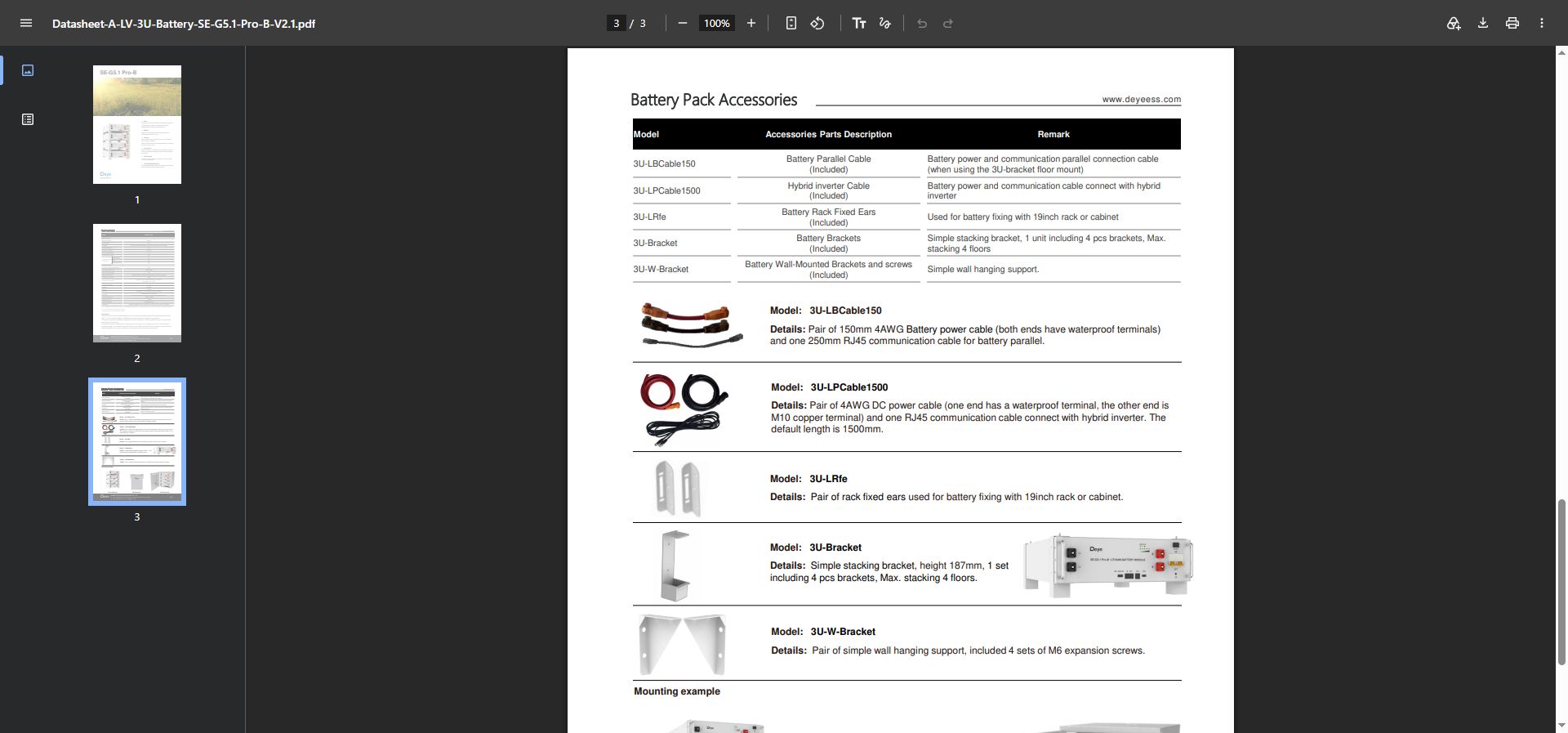
For example, the Deye SE-G5.1 Pro-B product information lists a 51.2 V nominal voltage, 100 Ah capacity and 5.12 kWh nominal energy. The same product page lists 4.6 kWh usable energy, CAN2.0 and RS485 communication, a 43.2–57.6 V operating range, and different warranty periods depending on the installation site. These are separate purchasing fields, not interchangeable marketing claims.
The energy calculation is simple:
51.2 V × 100 Ah = 5.12 kWh nominal energy
The quote must also state the usable-energy value, selected DoD, inverter battery-voltage window and current available at the intended temperature and SOC.
A second example: the Dyness DL5.0C document set
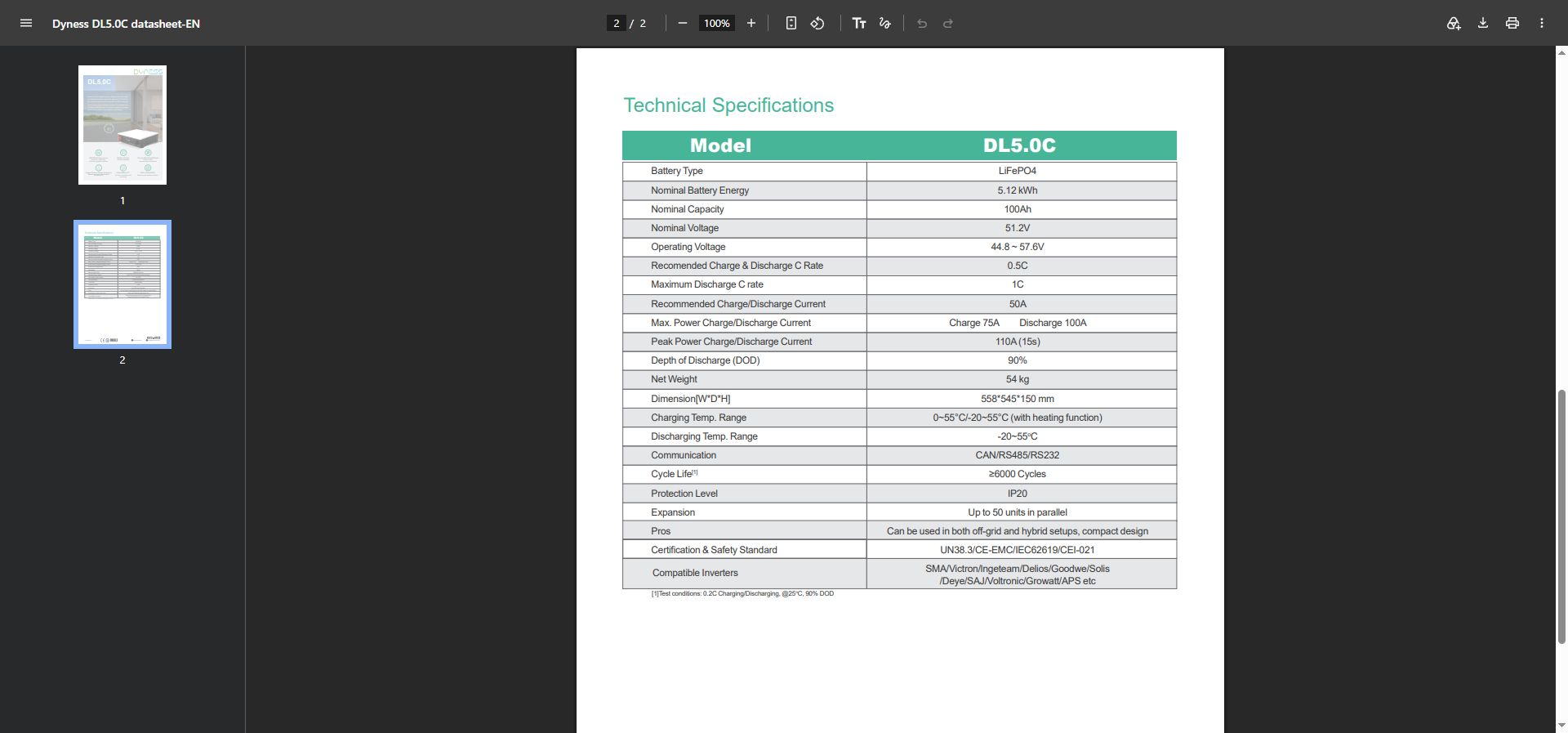
The Dyness DL5.0C datasheet identifies the battery as a 51.2 V, 100 Ah, 5.12 kWh LiFePO4 module. It lists a 44.8–57.6 V operating range, a recommended 50 A charge/discharge current, maximum continuous charge/discharge values of 75 A and 100 A, a 110 A peak value for 15 seconds, CAN/RS485/RS232 communication and up to 50 units in parallel.
That distinction matters when the battery is paired with an inverter. The quote can separate the recommended operating current from the maximum and peak values instead of treating one current number as the answer for every application.
2. Installation manual: confirm how the product is connected and commissioned
The installation manual turns a parameter sheet into an installable product. It should show:
- Positive and negative power terminals
- CAN, RS485 or other communication terminals
- Pinout and cable definition
- Termination-resistor requirements
- Communication address settings
- Master/slave logic for parallel batteries
- Maximum parallel quantity
- Mounting method and clearances
- Start-up and shutdown sequence
- Fault-code response
- Firmware update or service procedure
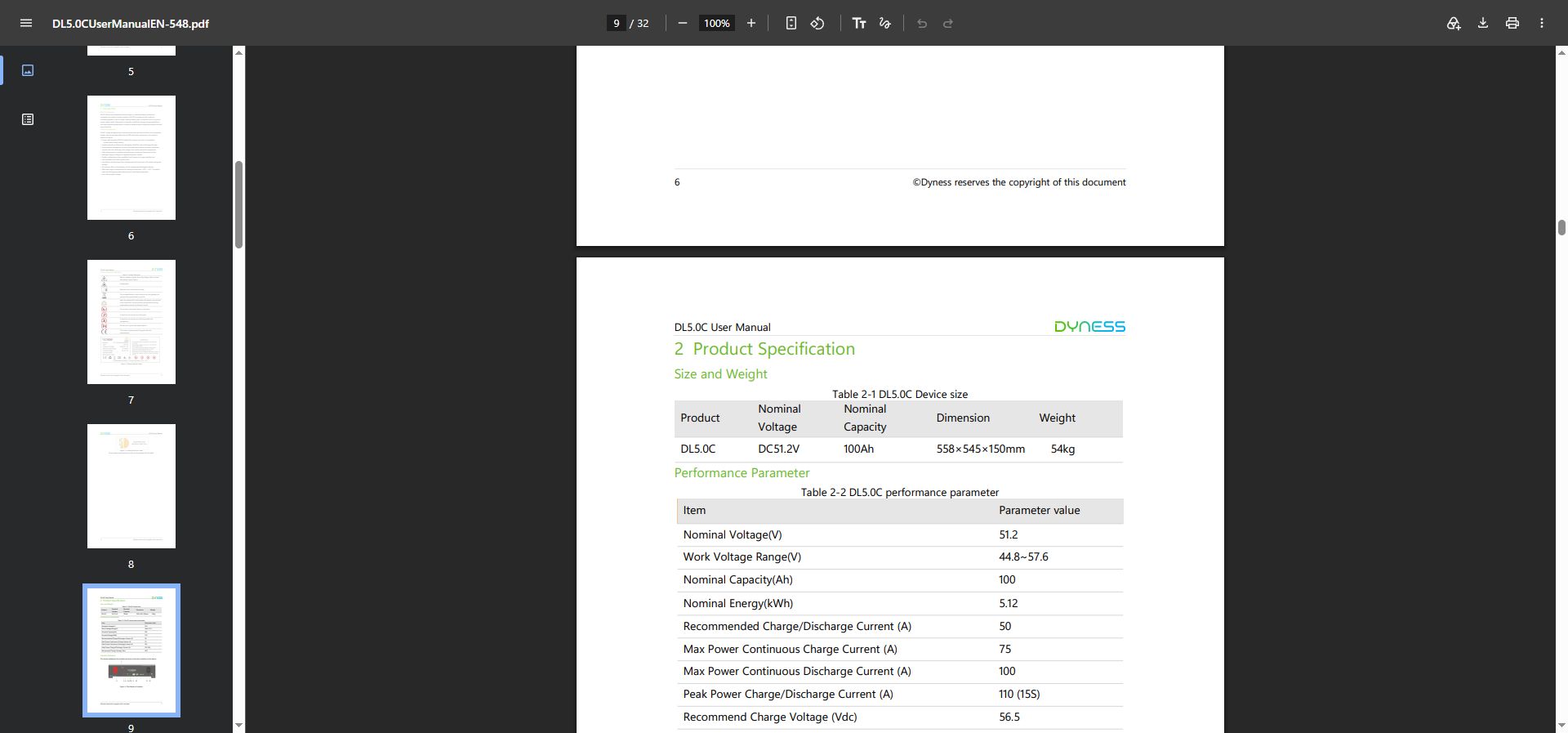
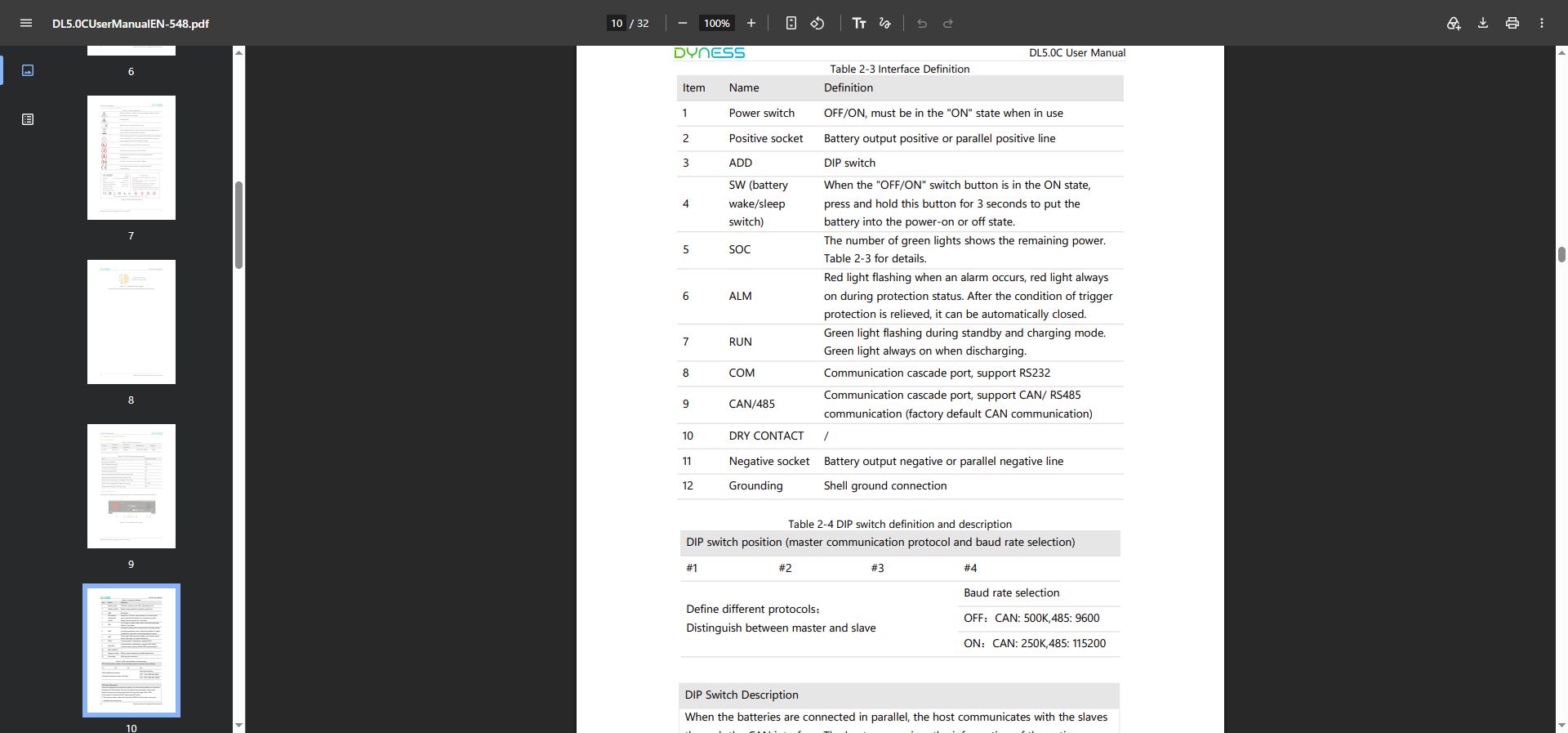
The Dyness DL5.0C user manual includes both a specification section and an interface-definition page. The latter shows where the power and communication connections sit on the battery, rather than leaving “CAN” and “RS485” as isolated words in a table.
Record the manual revision with the quotation. If the supplier changes the BMS, connector or firmware, the installer needs the new revision, not an older PDF saved in a project folder.
3. Certificates: verify the model and scope before using the certificate in a quotation
A certificate name alone does not cover the quoted battery. Match the certificate against:
- Exact battery model
- Product chemistry and configuration
- Certificate holder
- Manufacturing entity, where shown
- Standard and edition
- Test date or issue date
- Validity or renewal status
- Capacity and voltage range covered
- Target-market requirement
The Deye SE-G5.1 Pro-B product page lists UN38.3, IEC62619, CE, UK, VDE 2510-50, CEI 0-21, FCC, UL1973, UL9540A and UL9540. Its download area keeps the product specifications separate from statements and certificates. That makes the next check obvious: which claims are shown on the page, and which ones have a document behind them?
If the quoted battery has a different capacity, enclosure, BMS revision or market version, ask for the matching certificate or scope statement. A certificate for one model does not cover every model in the family.
4. Warranty document: turn a sales promise into a service record
A warranty file needs to settle the questions that affect the distributor’s after-sales cost:
- When does the warranty start: production, shipment, installation or commissioning?
- What capacity-retention level applies at the end of the warranty period?
- What DoD, temperature and charging conditions must be maintained?
- Is the warranty limited by cycles, energy throughput or time?
- Does it cover the cells, BMS, enclosure and communication board?
- Who diagnoses a fault?
- Who pays for replacement, freight and local labour?
- What evidence must the installer provide?
- Which installation or operating conditions are excluded?
The Deye SE-G5.1 Pro-B page shows a 5-year/10-year warranty field and points to the warranty policy because the period depends on the installation site. The page gives the headline term; the policy explains how that term works in a project.
Keep the warranty file with the quotation. It affects the customer’s decision, your pricing and the after-sales process after delivery.
5. Transport files: confirm that the battery can move through the logistics chain
Before the price is sent, collect the transport documents required for the chosen route. The set may include:
- UN38.3 test report
- SDS or MSDS
- Battery transport classification
- Packing instructions
- Gross weight and package dimensions
- Dangerous-goods information
- Shipping and customs notes
- Country-specific import documents, where applicable
UN38.3 and SDS/MSDS support transport and handling. They do not confirm grid approval, inverter compatibility or installation compliance.
The Deye SE-G5.1 Pro-B download area separates the SDS, installation manual, inverter compatibility statement and statement of compliance. The layout makes the document categories visible: transport, installation and system compatibility are separate checks.
6. BMS communication file: confirm the battery–inverter data path
The datasheet may list CAN or RS485, but the quotation needs a model-level communication record. Request:
- Communication interface
- Protocol name
- Connector and pinout
- Baud rate or CAN configuration
- Address and master/slave settings
- Supported inverter models
- Approved firmware versions
- Battery data exchanged with the inverter
- Fault-code and recovery behaviour
- Commissioning procedure
The Deye SE-G5.1 Pro-B information lists CAN2.0 and RS485. The Dyness DL5.0C datasheet lists CAN, RS485 and RS232. Pylontech’s US5000 product page lists RS485 and CAN in its communication interface field. These examples show what an interface entry looks like; they do not replace the protocol file or an approved compatibility record for a specific battery–inverter combination.
The quotation record needs the exact battery model, inverter model, BMS version, firmware version, cable definition and test result. “CAN supported” is only the starting field. “Battery model X communicated successfully with inverter model Y using firmware Z” is a project record an installer can use.
7. Model and version record: keep the sample, quotation and shipment aligned
The same battery family can have different capacity versions, BMS revisions, firmware packages and destination-market documents. Record the following in the quotation file:
| Record field | Example of what to record |
|---|---|
| Battery model | Exact model code, not only the product family |
| Capacity version | 5.12 kWh, 10.24 kWh or the exact quoted value |
| BMS version | Hardware or software revision shown in the supplier file |
| Firmware | Version used for the approved inverter combination |
| Datasheet revision | File name, issue date and revision number |
| Manual revision | Installation manual version used by the installer |
| Certificate scope | Model and market covered by the certificate |
| Production batch | Batch or serial range, when available |
This record protects the buyer from a common quotation problem: a sample is tested with one document set, while the production shipment is supplied with another version that was never checked with the selected inverter.
The five-step document audit before quotation
Step 1: Match the model across every file
The model code on the quotation, datasheet, manual, certificate, warranty and transport files must describe the same product.
Step 2: Match the electrical parameters
Compare voltage range, current, usable energy, DoD, parallel quantity and communication fields. Record different test conditions instead of choosing the most attractive number.
Step 3: Match the target market
Check whether the certificate, installation instructions, transport documents and grid-related statements apply to the buyer’s destination country.
Step 4: Match the battery with the selected inverter
Use the battery model, inverter model, protocol, pinout, firmware and approved list as one compatibility chain.
Step 5: Lock the document revision
Save the files used for the quotation with their issue date and version. Ask the supplier to notify the buyer before a technical or document change reaches the next shipment.
Documents that should not be accepted as the complete pack
These items can support a sales conversation, but they do not replace the supplier file set:
- A product image without a model code
- A one-page marketing brochure without test conditions
- A certificate showing a different battery model
- A warranty sentence without operating conditions
- A “CAN supported” label without pinout or protocol information
- A UN38.3 reference without the matching model and transport file
- A datasheet with no revision date
- A sample report that does not identify the tested firmware or inverter
The goal is not a thicker folder. It is a consistent set of files that supports the quote, the installation and the after-sales decision.
How CVC helps prepare a supplier document pack
CVC connects distributors, importers and installers with suitable energy-storage supply sources. Send the following project information:
- Target country or market
- Battery type and required capacity
- Inverter brand and model
- Application and backup requirement
- Sample or purchase quantity
- Expected delivery time
- Required certificates and transport files
- Communication or installation requirements
CVC can then help identify the matching factory supply path, request the model-specific technical documents, compare the battery and inverter conditions, and organize the information needed for a controlled quotation.
The file set stays tied to the selected model, market and project conditions. That gives the distributor a quote they can explain and the installer a configuration they can execute.
Home battery quotation document checklist
- [ ] Exact product model and capacity
- [ ] Datasheet with issue date and test conditions
- [ ] Installation and commissioning manual
- [ ] Certificate and scope statement
- [ ] Warranty terms and service route
- [ ] UN38.3 test report
- [ ] SDS/MSDS and transport information
- [ ] BMS communication and pinout file
- [ ] Approved inverter list or compatibility statement
- [ ] Firmware and BMS version record
- [ ] Packaging, weight and shipping dimensions
- [ ] Target-market document confirmation
Frequently asked questions
Is a product datasheet enough to quote a home battery?
No. The datasheet supports the technical description, but the quotation also needs the installation manual, certificate scope, warranty terms, transport documents and battery–inverter communication information.
Does a certificate for one battery model cover the whole product family?
Use the certificate scope and model information to determine coverage. Different capacity, enclosure, BMS or market versions need supplier confirmation.
Should UN38.3 be treated as an inverter-compatibility document?
No. UN38.3 supports battery transport testing. Inverter compatibility requires the battery model, inverter model, communication protocol, wiring, firmware and commissioning evidence.
What information should a buyer send to CVC?
Send the target market, battery capacity, inverter model, quantity, application, delivery time and required documents. CVC can use those fields to coordinate the matching supply and technical file.
Request a complete supplier document pack
Send your battery model or required specification, target market, inverter model and purchase quantity. CVC can help you find the matching product source and collect the documents needed for quotation and project review.
Request Supplier Documents

Peter Yin
Request a complete supplier document pack
Send your battery model, target market, inverter model, required documents and purchase quantity. CVC can help identify the matching product source and organize the supplier files for quotation and project review.