
The inverter has stopped. The battery display says 0%. The grid is still down, and the supplier replies, “Just wait for the solar to recharge it.”
That is only half an answer. It says what might happen next, but it does not explain why the system stopped or whether the battery and inverter can restart.
When a home battery reaches 0%, the cells are not automatically empty. The BMS may have reached its discharge limit, communication may have failed, or the battery may have entered a low-power sleep state. These conditions look similar on the screen, but the recovery path is different.
Quick answer: A 0% display usually means the system has reached its configured lower SOC limit or a protection state. It does not prove that the battery is damaged. Check the BMS status, inverter alarm, charging source, communication protocol and approved restart sequence before replacing anything.
A 0% display can hide four different faults
The number on the screen is only one signal. Separate these conditions before choosing a recovery action.
| What you see | What it usually points to | What to check |
|---|---|---|
| SOC reaches 0%, normal status remains | Configured discharge cut-off | Charge source, inverter settings and normal restart sequence |
| SOC reaches 0% with a BMS fault | Protection opened the charge or discharge path | Alarm history, cell voltage, temperature and current limits |
| Screen or LEDs go dark | Sleep mode, open breaker or missing auxiliary power | DC isolator, battery breaker and approved wake-up method |
| Battery wakes but inverter does not recognise it | Communication, addressing, protocol or firmware mismatch | CAN/RS485 wiring, selected profile and firmware version |
The common mistake is to treat every 0% display as an empty battery. SOC is an operating value controlled by voltage limits, current limits, temperature protection and communication logic; it is not a direct reading of every usable watt-hour inside the cells.
Black start is a system function
Black start means the energy storage system can restart without a live utility grid. In a residential system, that can involve the battery, BMS, hybrid inverter, backup output and a charging source such as PV or a generator.
Capacity alone cannot confirm black-start capability. “Backup power” and “black start” are different claims: the first describes what the system supplies during an outage, while the second describes how it starts when the grid is absent.
A real 51.2V battery example
A published 51.2Vdc LiFePO4 low-voltage battery specification lists a 3.6kWh to 14.4kWh capacity range, a 41.6V to 58.4Vdc operating range and CAN, RS485 and WiFi communication.
These figures are useful because they show what a technical review must contain. They do not prove black-start capability. The approved restart path still depends on the inverter, firmware, wiring, communication profile and operating mode.
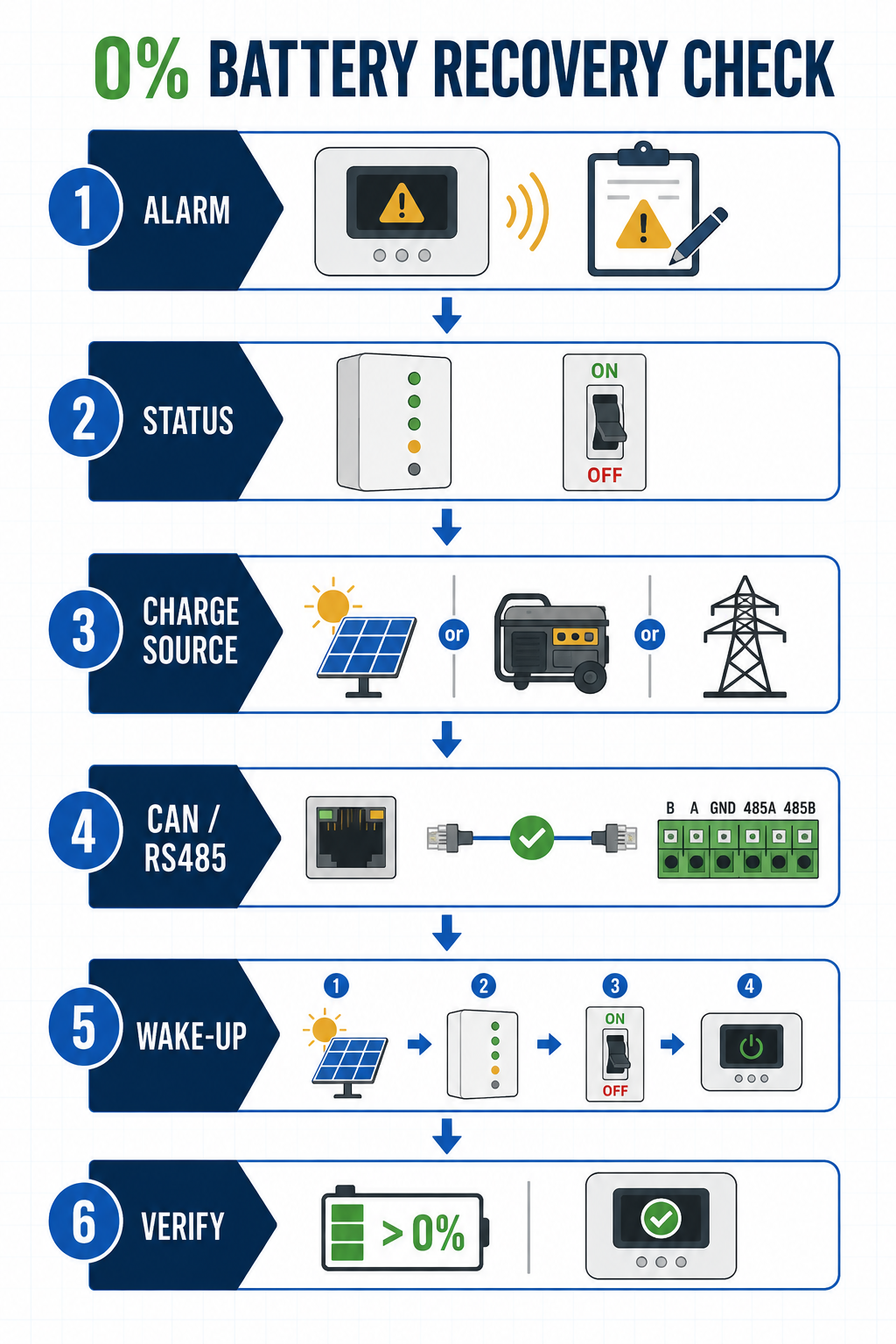
What to check when the battery reaches 0%
Do not force a charge or bypass the BMS. Identify which part of the system has stopped, then follow the model-specific procedure.
1. Record the inverter alarm
Save the alarm code, battery voltage, PV input, AC input and the time at which the inverter stopped. Record the original code before clearing it.
2. Read the battery status
Note whether the battery shows charging, discharging, fault or no power. If there is no display, check the battery breaker and DC isolator according to the manual. Do not remove covers or bypass the BMS to obtain a reading unless the procedure is approved for that model.
3. Confirm the first charging source
Determine whether the system can start from PV, utility AC through the inverter, a generator or an approved external service charger. These sources are not interchangeable.
4. Check the data connection
Inspect CAN or RS485 wiring, termination, addressing, protocol selection and firmware. A connector that fits does not prove that the two devices exchange the correct data. A battery can show voltage on a multimeter while the inverter still refuses to charge it.
5. Follow the approved wake-up sequence
The sequence may include closing a breaker, enabling the inverter charger, applying AC or PV input, pressing a battery button or waiting for the BMS self-check. Do not repeat random power cycles while the battery is in a protection state.
6. Verify the restart
Recovery is not complete when the display changes from 0% to 1%. Confirm that the battery is recognised, charge current is within range, the BMS reports normal temperature and cell status, SOC rises normally, critical loads remain stable and the original alarm does not return.
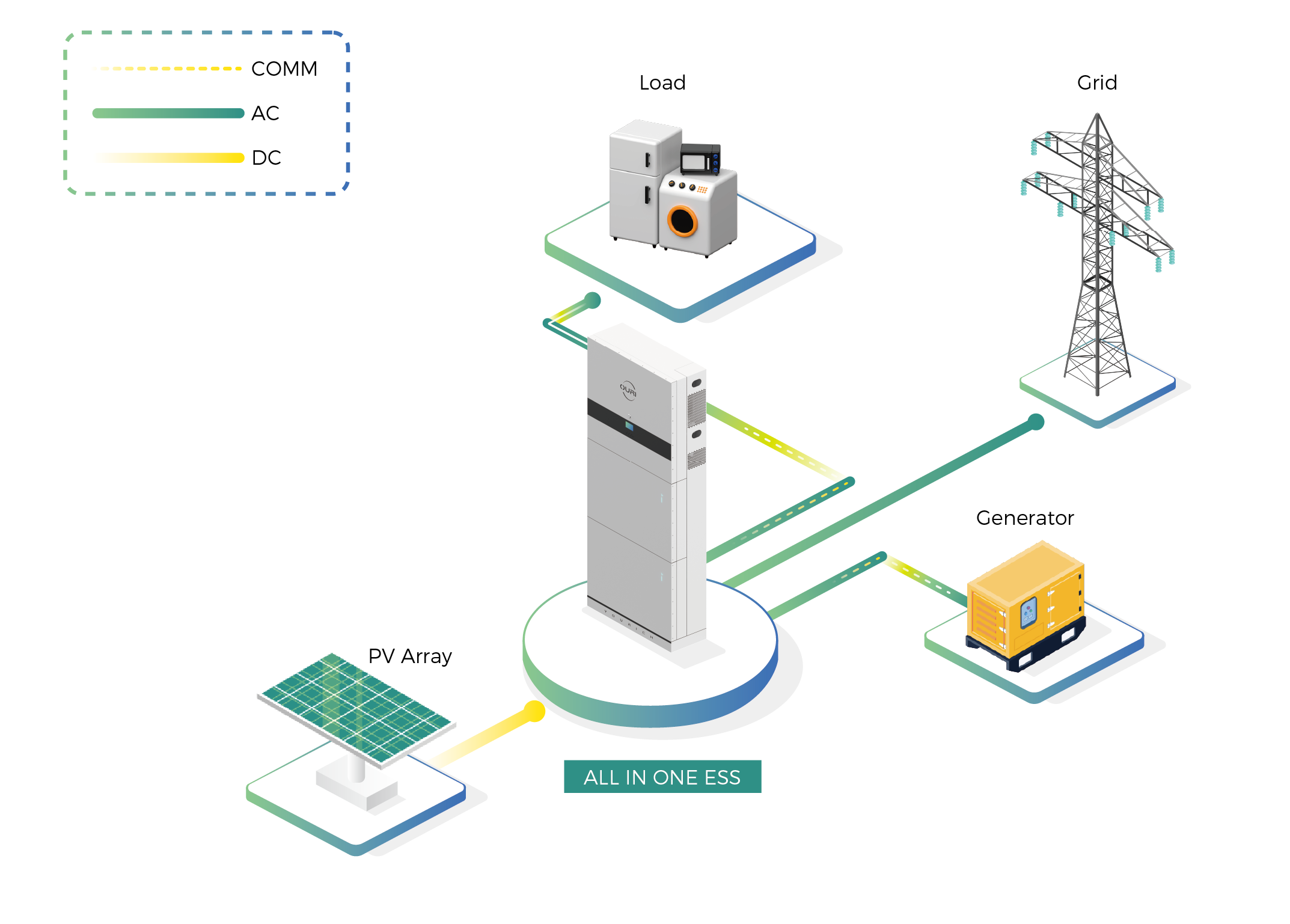
The standby load can drain the system while you wait
The battery may reach 0% faster than expected because the inverter control board, communications gateway, display or contactor circuit continues consuming power after the household load is disconnected.
Before quotation, ask what the system consumes after low-SOC cut-off, whether the BMS stays awake, which source can wake the system and whether automatic restart is enabled by default. A runtime figure that ignores standby consumption is incomplete.
What to request before buying a backup battery
- Battery datasheet with low-voltage and protection limits
- Battery manual with sleep, wake-up and recovery instructions
- Inverter manual showing minimum battery start conditions
- Approved battery-inverter compatibility checklist or protocol reference
- Black-start statement for the exact model combination
- Standby consumption or low-SOC behaviour
- Alarm and event-log procedure
- Recovery responsibility under the warranty terms
If the supplier only answers “51.2V is compatible with a 48V inverter,” stop and ask for the operating range, current limit, communication protocol, firmware and restart method. Voltage is only the first line of the review. The 48V and 51.2V battery-inverter guide explains the matching problem in more detail.
Common questions
Does 0% mean the battery is permanently damaged?
No. It may indicate a discharge cut-off or BMS protection state. Damage cannot be confirmed from the SOC display alone; check the BMS status, cell data and recovery procedure.
Can solar panels wake a battery that reaches 0%?
Only when the battery, inverter and PV operating mode support that sequence. Confirm the exact PV wake-up conditions in the system manual.
Is black start the same as backup power?
No. Backup power describes the output during an outage. Black start describes how the system starts without a live grid.
Can another battery be connected to wake the first one?
Do not do this unless the exact model manual approves it. Different SOC, voltage, age, BMS settings or firmware can create an uncontrolled current path.

ABOUT THE AUTHOR
Peter Yin
Energy Storage Technical Sourcing Specialist and Industry Analyst
Peter Yin works on LFP batteries, hybrid inverters, product verification, supplier quality control and battery-inverter compatibility. His articles focus on the evidence needed to make a safe product and sourcing decision.
Review the battery restart path
Send the battery model, inverter model, firmware, communication protocol and recovery source when you need the configuration checked before quotation.